

Description
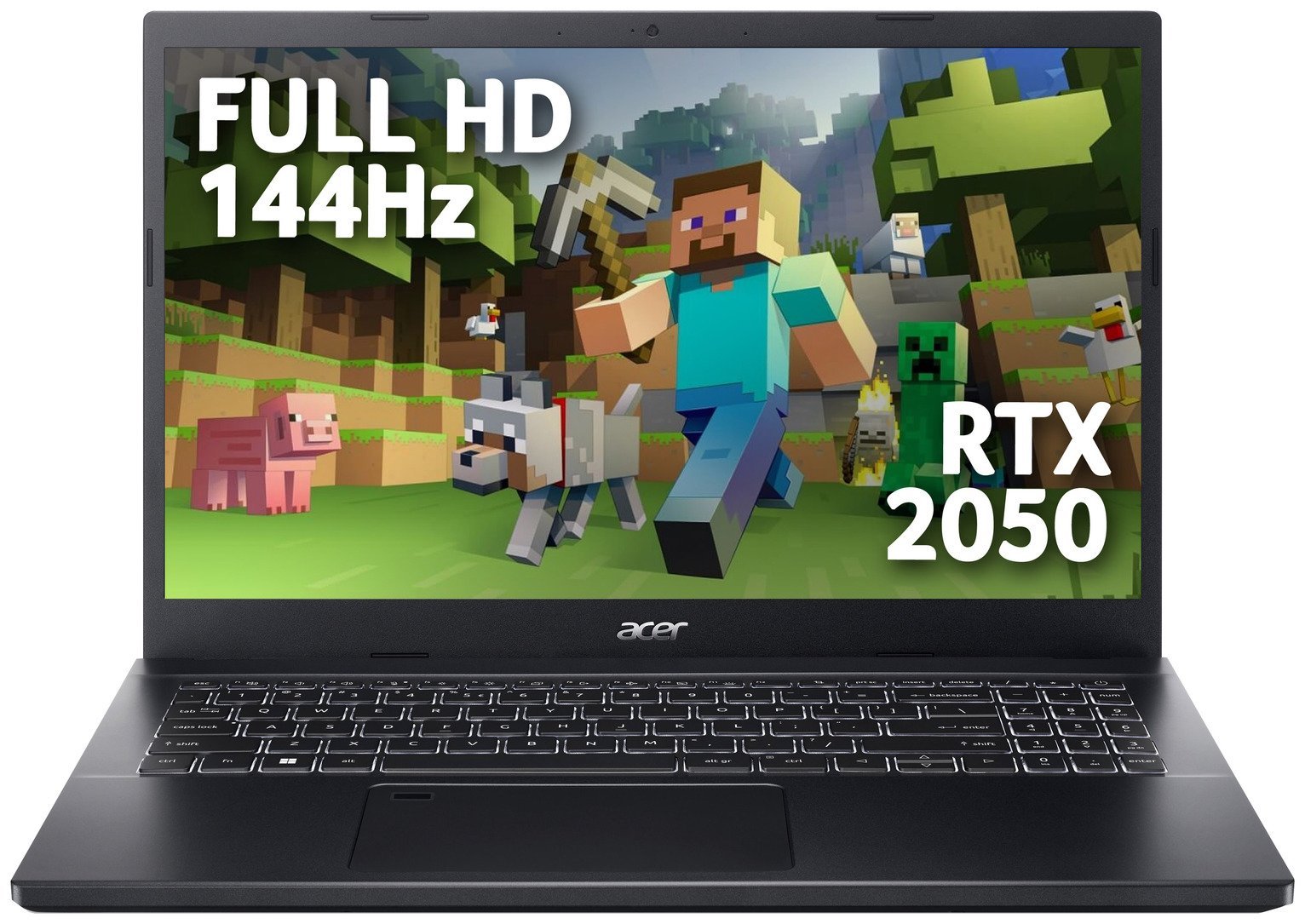
Acer’s Aspire 7 is a premium laptop with powerful hardware, making it an ideal all-round laptop for content creation tasks and light gaming. Equipped with a 12th gen Intel Core i5 CPU, 8GB of RAM and an NVIDIA RTX 2050 GPU, the Aspire 7 can handle a wide range of demanding tasks such as photo & video editing and light gaming. . Additionally, the 512GB SSD has plenty of space to store your apps and files. The Aspire 7 also features a 15.6-inch Full HD IPS display with a 144Hz refresh rate, which combines sharp detail with smooth, blur-free motion. . Fingerprint reader – the Windows Hello certified biometric fingerprint reader helps keep all your files & data safe while also making it quick and easy to login. . Model number: A715-76G. . Part number: NH. QMYEK.004. General features: Suitable for Gaming.; Size H1.9, W36.23, D23.74cm.; Weight 2.1kg.; CPU, Memory and Operating System: Intel Core i5 – 12450H processor.; Octa core processor.; 2GHz processor speed with a burst speed of 4.4GHz.; 8GB RAM DDR4.; 512GB SSD storage.; Operating System: Windows 11 Home (Pre-Installed).; Display features: 15.6 inch screen.; Full HD Display.; Resolution 1920 x 1080 pixels.; Refresh rate 144 Hz.; 178 degree viewing angle.; Screen Type: IPS.; Brightness (Nits): 250.; Anti-Glare Screen.; Graphics: NVIDIA RTX 20 Series GeForce RTX2050 graphics card with 4GB RAM GDDR6.; Dedicated graphics card.; Interfaces and connectivity: 3 USB 3.2 ports.; Ethernet port.; HDMI port.; Headphones jack.; Bluetooth.; Wi-Fi enabled.; Multimedia features: HD webcam.; Built-in mic.; Backlit keyboard.; Built-in audio sound system.; Software Included: 30 day trial Microsoft 365 Personal.; 30 day trial Norton Security.; General information: Box Contents: Aspire 7 Gaming Laptop, 135W 3-Pin Charger, Setup Guide.; Manufacturer’s 1 year guarantee.; EAN: 4711121627316.




Anonymous –
Brilliant working perfectly
Anonymous –
So happy with this laptop. Runs my games brilliantly, graphics card is a great help. Nice looking and all round great laptop.
Anonymous –
I bought this laptop for my son as he wanted to go on Minecraft and he also pestered me for GTA V so me being a great dad said well your birthday is coming up and thank you for the birthday gift idea, well he is very happy with it
Anonymous –
I am not a massive gamer but do have all The Sims 4 expansion packs and mods/cc and my old laptop was struggling to run anything. This is working very smoothly
Anonymous –
As my initial review got deleted so I am reposting it.
2/10. The display, sound, battery and performance is no where what you’d expect from a gaming laptop. Just a cheap machine. Dont waste money thinking it is a gaming laptop, invest the same on half decent machine out there.
Terrible experience
Anonymous –
Good product for gaming
Anonymous –
I am happy with the product as of now
Anonymous –
Recommend for buying. It not my first Acer. Works very well. Recommend.
Anonymous –
Really pleased with this laptop. It’s fairly simple to remove the back cover (10 phillips screws), the 8Gb included RAM is user-removable, so it’s simple to upgrade it to 16Gb or beyond with DDR4 memory cheap and easy to come by. Upgrading it to 16Gb was my first task with it, and I had no issues and it’s amazingly quick and responsive with everything I throw at it. It also has a spare Gen 3 NVME slot so you can add another, say, 2TB storage relatively cheaply too. And it’s a spare slot so the new storage would be in addition to the 512Gb it ships with, without the fuss or reinstalling Windows, although in theory you could remove the included 512Gb too for full flexibility. I think this is where it excels over, say, a MacBook, you can start with 8Gb RAM and 512Gb hard drive and fairly easily upgrade it with the help of a few YouTube videos and half an hour of your time. Even the sticker on the laptop touts that it’s “user upgradable”. The screen isnt OLED but it’s clear and bright. The only minor down side is the battery life is probably only 3 to 4 hours of what I would call standard use, but you can charge it via the included charger or Thunderbolt 4 USB-C which is great.
Anonymous –
I bought this as an affordable option to replace my obsolete 10yo laptop and while I wasn’t expecting much for a midrange machine, it exceeded my performance expectations.
The CPU is very capable and the RTX 2050 graphics card provides some good quality gaming performance, I wasn’t expecting this card to play games well at all however the games I have run so far have been great. You won’t get 60fps ultra graphics settings in current AAA games however you will get playable framerates with fairly high graphics settings. I allowed my son to try his Fortnite game on it and it was perfect at maxed-out settings.
The backlit keyboard is a nice touch for a cheaper machine and is a welcome inclusion, there are no RBG options but lit does its job well.
This laptop comes with one stick of RAM installed, and there is an empty memory slot available so when you’re ready you can install another 8GB to unlock more performance from dual-channel memory, I was sure to check what RAM was installed already and matched that stick with another one I purchased for £15, bargain upgrade.
There is also an empty NVME Gen 3 slot inside for expanding the laptop’s storage. This was a pleasant surprise for such a budget machine as it means you can increase the storage without the hassle of reinstalling windows on a new Drive. The included 500GB drive is respectable for the price, many other similar machines only have smaller drives so well done ACER.
All in all I can’t fault this machine for the price and features, the keyboard num pad is a little small for my clumsy sausage fingers but that is a minor thing and I haven’t had any issues at all after getting used to it.
My only advice is if you decide to upgrade the memory, please either have some knowledge of opening laptops or get someone to do it for you as it does involve removing the entire base of the machine, and 8 easy Philips screws however plastic pry tools are highly recommended to avoid damaging the plastic casing.
Some good guides on YouTube can detail this.