

Description
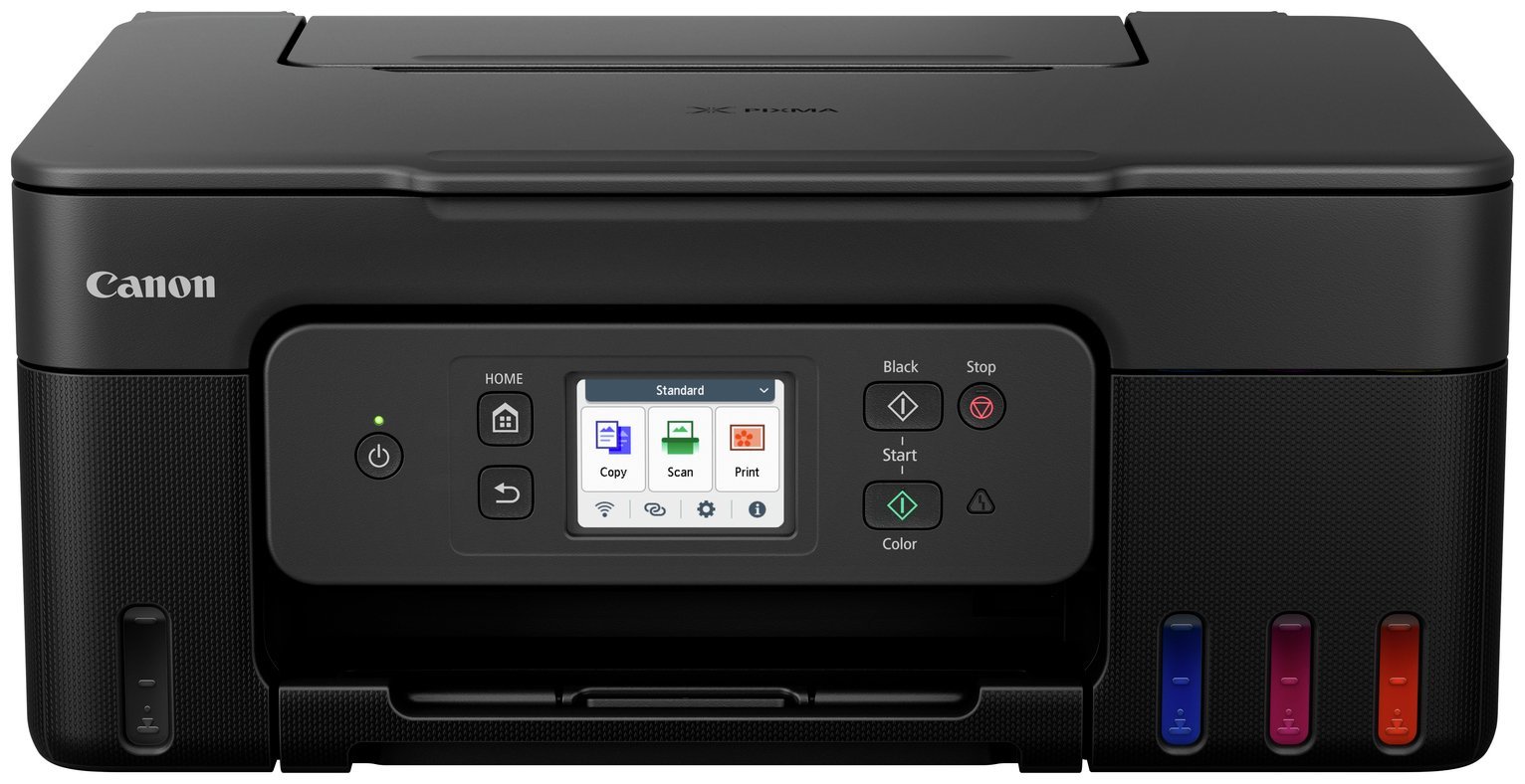
Drive down your home printing costs with this high-yield, easy-to-use 3-in-1 MegaTank printer, which offers high-volume user-refillable ink tanks that offer massive savings on ink costs. Print high-quality documents and photos on a wide variety of media, easily print two-sided documents with automatic duplex printing and connect to computers and smart devices seamlessly via Wi-Fi. . ULTRA-LOW RUNNING COSTS – Make huge savings over the printer’s lifetime thanks to refillable high-yield ink tanks. Print 6,000 pages from a black ink bottle (7,600 in Economy) and 7,700 pages from colour ink bottle (8,100 in Economy). . FAST, HIGH-QUALITY PRINTS – Both documents and photos look fantastic, thanks to pigment black ink and dye-based colour inks. And they arrive quickly too, with print speeds of 11.0 ipm (mono) and 6.0 ipm (colour) and automatic duplex printing. Printer: Compatible with PC and Mac.; A4 print speed – black text: 11ppm (pages per minute).; A4 print speed – colour text: 6ppm (pages per minute).; Up to 4800 x 1200dpi print resolution.; Up to 4800 x 1200dpi colour print resolution.; Fits paper up to A4.; Prints on paper up to 265gsm.; Automatic duplex (double sided) printing.; Borderless printing.; 100 sheet paper capacity.; Recommended ink: GI-51 PGBK GI-51 C GI-51 M GI-51 Y.; Scanner and copier: 600 x 1200dpi optical resolution.; Fits paper up to A4.; Flat bed scanner.; Connectivity: Suitable for office printing.; Suitable for photo printing.; USB port.; Wireless/WiFi enabled.; Apple AirPrint – depending on device, please check your manufacturer’s settings.; Email Print.; Mobile print enables printing directly from your smartphone or tablet through brand specific apps.; Compatible app: Canon PRINT app Easy-PhotoPrint Editor app Creative Park app.; General information: Minimum Mac operating system required: macOS Big Sur 11.7.6 macOS Sonoma 14 Chrome OS.; Minimum Windows operating system required: Windows 11, Windows 10Windows 8.1Windows 7 SP1 Operation can only be guaranteed on a PC with pre-installed Windows 7 or later.; 6.7cm display with touchscreen.; Photo editing software included.; Weight 6.5kg.; Includes PIXMA G3590 Printer, x4 high-yield ink bottles, Power cord, Manuals.; Ink cartridge included.; Size H17.7, W41.6, D36.3cm.; Manufacturer’s 2 year guarantee.; EAN: 4549292235104.

Anonymous –
Connects wirelessly to an iMac and a Dell laptop so printing is now faster and much much more reliable. A very easy set-up which, together with low-cost ink tanks, makes this printer exceptional value.
Anonymous –
First impressions, cheap plastic. Not a patch on my old Canon MG7150. Lots of useless paper inserts in every language of the world, (hard to find English text) Canon Club, Canon safety…. don’t drink the ink….!!!! Canon PSTI Declaraion (for the UK only…whatever that means!! Canon European Warranty System EWS….. But set up Instructions….. well as good as none, …utterly useless 3 pictorial captions. My advice search for a YouTube how to video. Follow the instructions using the printer LCD display.
Printer results are very disappointing, blacks in texts are washed out, terribly poor print quality in normal, I will not even think of attempting draft, judging by how poor normal print is. Copying process, long winded guess work, but satisfactory. I have not printed a photograph at this stage.
Anonymous –
I did not get it I had a message to collect when i arrived they hadn’t got it & could not tell me when i could collect it
Anonymous –
Does exactly what it says on the box 5⭐️
Anonymous –
Easy setup, good print quality and reasonable prining speed.
Anonymous –
Great printer and definitely one of the easiest that I have ever installed at Home… Would be nice to have the Eco turn off feature easier to find though.
Anonymous –
I bought this like 6months or more this item is fantastic
Anonymous –
I bought this a few weeks ago to replace my previous Canon printer. After much research I decided to choose ink tanks, all good so far . Didn’t take too long to set up. Good quality printing and fairly quiet.
Anonymous –
Generally am pleased with the printer but it takes 20+ seconds to respond when I press send, It also frequently cannot find the printer even though it uses both wifi and USB connection – it gets there eventually.
Your illustration of the printer shows the ink colours as being visible but I cannot see anything at all – how shall I know when the ink is running out?
Compared with my previous Canon printer the scanner does not start from the little info screen like the copier does but I have to set it off from the computer – it does do a good scan however.
Adjusting the magnification is much easier on this printer compared with my old one. printi ng is noisier on this machine.
Anonymous –
Once set up this printer connects and works well, so far.
I have 2 issues with the purchase and set up though.
SET UP: the instructions are all on-line and are absolutely awful. Thank goodness for U-Tube. That’s what I used successfully. It’s a bit poor that the manufacturer can’t do better though.
£30 REFUND OFFER: it said that there was a £30 refund from Canon, after purchase. So I dutifully completed and returned the required form, with all the information required, 2 weeks ago. I have not had either the £30 or an acknowledgement from Canon.
Printer good, Canon not so good.